
Sensa Mobile App
This is one of the products I’ve worked on at Kilo Health. Sensa is a mobile app developed to help people suffering from a wide range of mental health conditions. This is achieved through CBT (Cognitive Behavioral Therapy), which primarily aims to change a person’s thinking patterns.
Together with behavioral psychoterapist Dainius Jakučionis and Dr. Monisha Vasa, we developed digital tools that empower people to help themselves.
In our pursuit to continually improve Sensa’s user experience, we conducted a series of design experiments focused on enhancing engagement, retention, and overall satisfaction. By leveraging user feedback, behavioral insights, and A/B testing, we were able to iterate on key aspects of the app, such as content accessibility, navigation, and task completion. These experiments provided valuable learnings that informed our approach to designing a more user-centered, flexible, and intuitive experience, driving measurable improvements in how users interacted with Sensa.
Experiment 1
Plan Card Redesign Led to 18% Increase in Engagement
Context
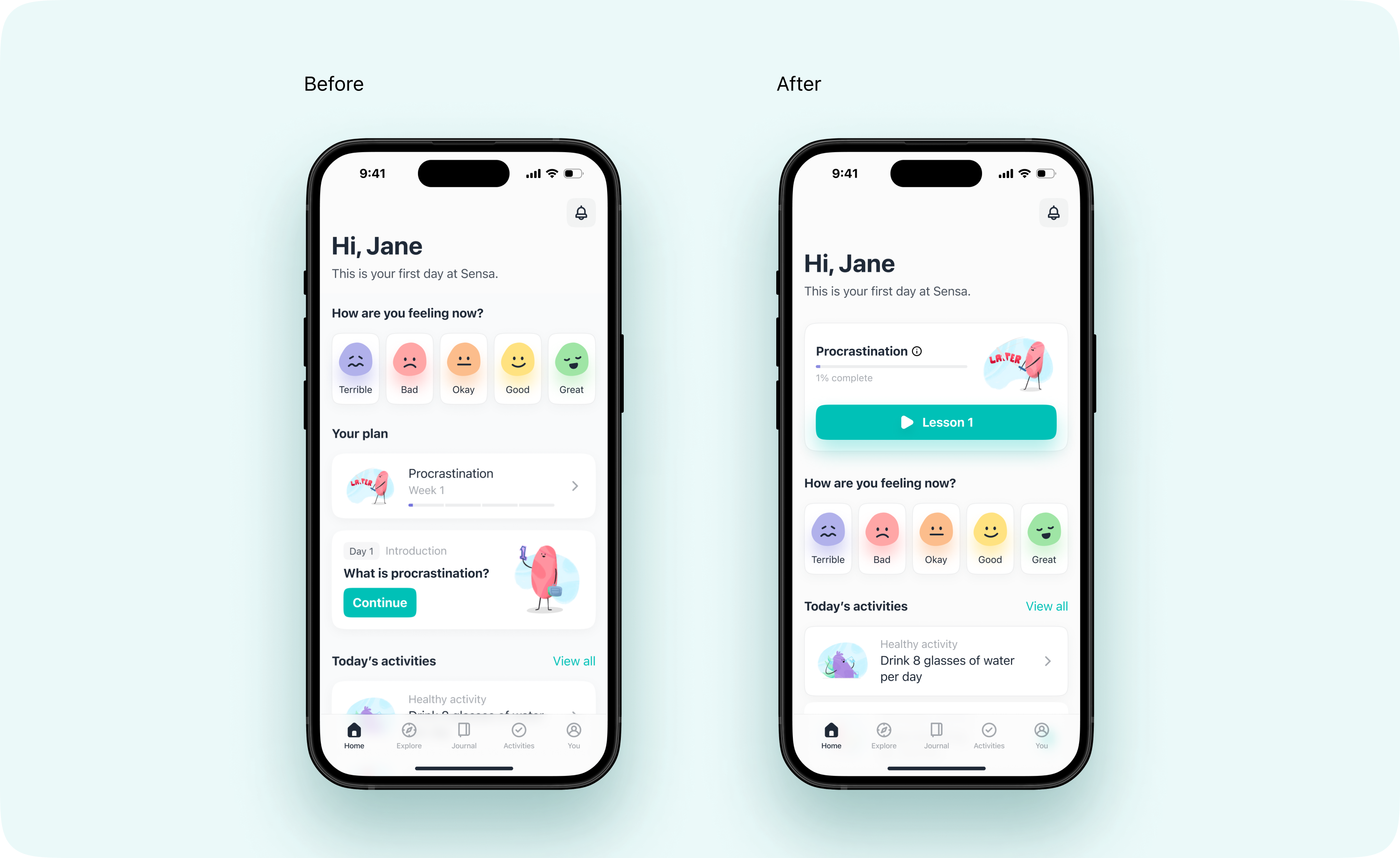
The personalized plan is Sensa’s main selling point, that’s why the plan card was prominently positioned at the top of the Home screen. To make the plan more accessible and engaging, I merged the plan card and day card into a single, unified card, while also expanding the CTA to span the entire width of the card for greater visibility and ease of interaction.
Problem
The previous design separated the plan and day cards, creating unnecessary complexity and making it harder for users to engage with their plans. The scattered placement of the CTA also increased cognitive load and reduced the likelihood of user interaction. We needed to streamline the experience to make it easier for users to access and interact with their plans.
Solution
I redesigned the Home screen by merging the plan and day cards into one unified card and repositioned it at the top of the screen for better accessibility. Additionally, I applied Fitts’s Law, which states that the time required to move to a target is a function of the distance and size of the target. By extending the CTA across the entire width of the card, we reduced the physical and cognitive effort needed to interact with the plan, making it more intuitive.
Impact
The A/B test ran with 1,500 users over two weeks. Half of the users experienced the original card layout, while the other half used the new, optimized design. The results were significant:
-
Plan engagement increased by 18%, as users accessed their personalized plans more frequently.
-
Task completion rates improved by 15%, showing users were progressing through their plans more effectively.
-
There was also a 12% reduction in user drop-off within the plan section, indicating that the new layout was easier to navigate.
Learning
The redesigned plan card greatly improved the overall user experience. By simplifying the design and making interaction easier with the full-width CTA, we saw notable improvements in plan engagement, task completion, and retention. This experiment validated the importance of streamlining the user interface to remove friction and enhance user satisfaction.
Experiment 2
Revamping the Plan Screen and Removing the One-Day Lesson Restriction Led to a 14% Increase in Daily Active Users
Context
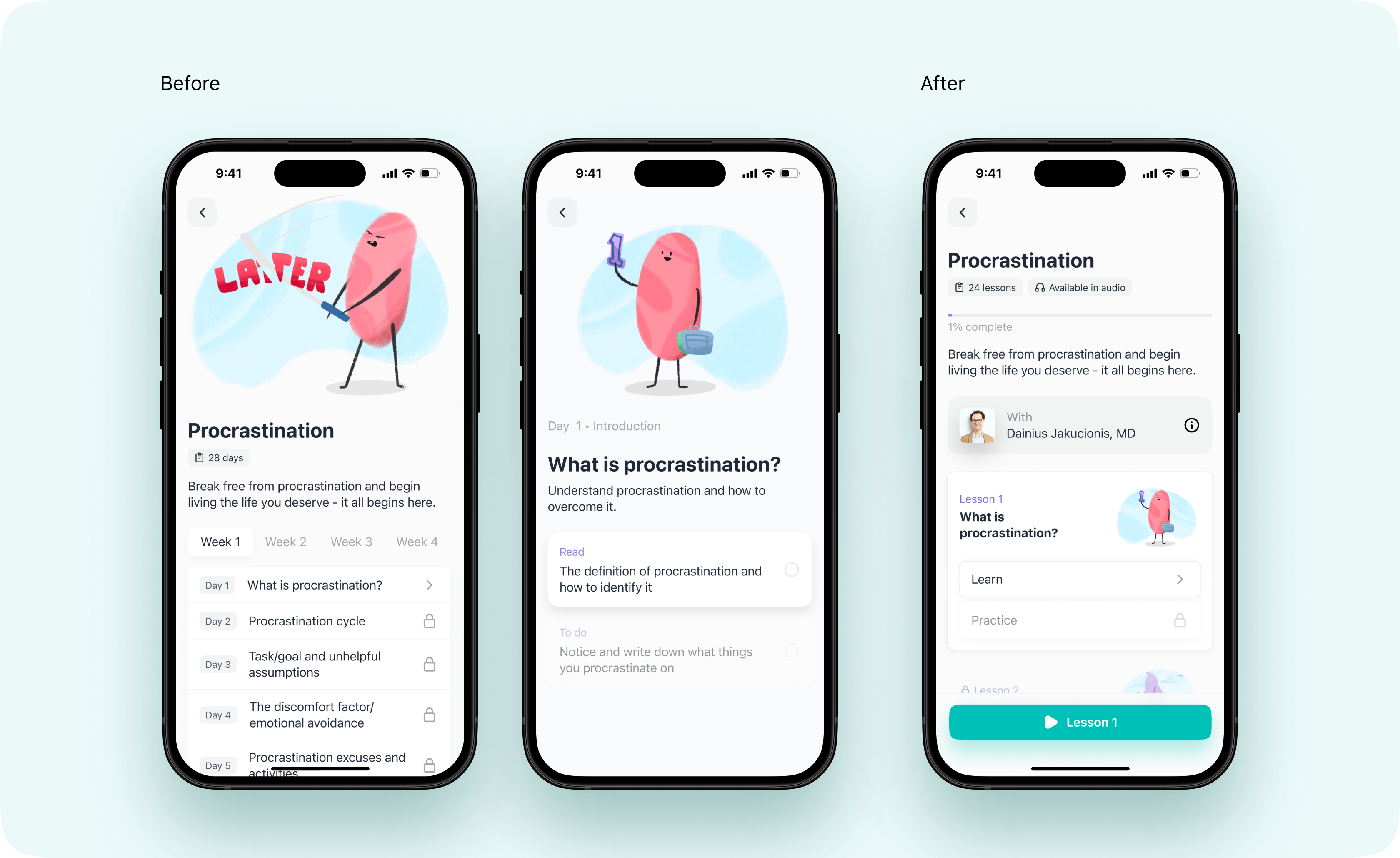
Initially, users could only complete one lesson per day, and the app’s main plan screen consisted of separate “Plan View” and “Day View” screens, where users had to tap on a specific day to access their lesson. The aim was to increase user engagement by providing more flexibility and simplifying the plan interface.
Problem
The existing two-screen setup (Plan View and Day View) added friction, making it harder for users to access and follow their personalized plans. This rigid structure resulted in user frustration, disengagement, and reduced satisfaction. Additionally, users felt constrained by the one-day lesson limitation. Many were motivated to progress through lessons at a faster pace, especially during periods of heightened interest or motivation.
Solution
Introduced two key changes:
-
Revamping the Main Plan Screen: I consolidated the two-screen setup into a single, streamlined plan screen. Instead of navigating through specific days, users now interacted with a unified lesson list, making it easier to follow and engage with their personalized plans. The new layout provided a clearer overview of the user’s progress and made content access more intuitive.
-
Removal of the One-Day Lesson Restriction: Users were given the ability to progress through their lessons at their own pace. Each lesson was split into “Learn” and “Practice” sections, ensuring that users completed the learning component (either through reading or listening) before proceeding to the practical tasks. This allowed users to move faster through the content if they wished, aligning with their motivation and schedules.
Impact
These changes had a significant impact:
-
14% increase in Daily Active Users (DAU): By removing the daily limit and simplifying navigation, users were more motivated to engage with their personalized plans on a daily basis.
-
17% rise in user retention: Users who were previously disengaged due to the rigid structure were now able to stay engaged over a longer period.
-
Increased content accessibility: The streamlined lesson list made it easier for users to see their progress and dive into their next task without unnecessary friction.
Learning
This experiment underscored the importance of flexibility and ease of use in content delivery. By revamping the plan interface and removing the one-day lesson limit, we significantly improved the user experience. Users felt empowered to control their learning pace, which led to higher satisfaction, more frequent app usage, and greater long-term retention.
Experiment 3
Breathing Exercise Redesign
Context
In mental health and wellness apps, quick-relief features like guided breathing exercises play a crucial role in helping users manage stress and anxiety in real-time. However, the original Breathing Exercise in our app lacked visual appeal and interactive elements, limiting its effectiveness. Users reported that the design felt flat and uninspiring, which reduced their engagement with the feature during moments when they needed calming support the most.
Problem
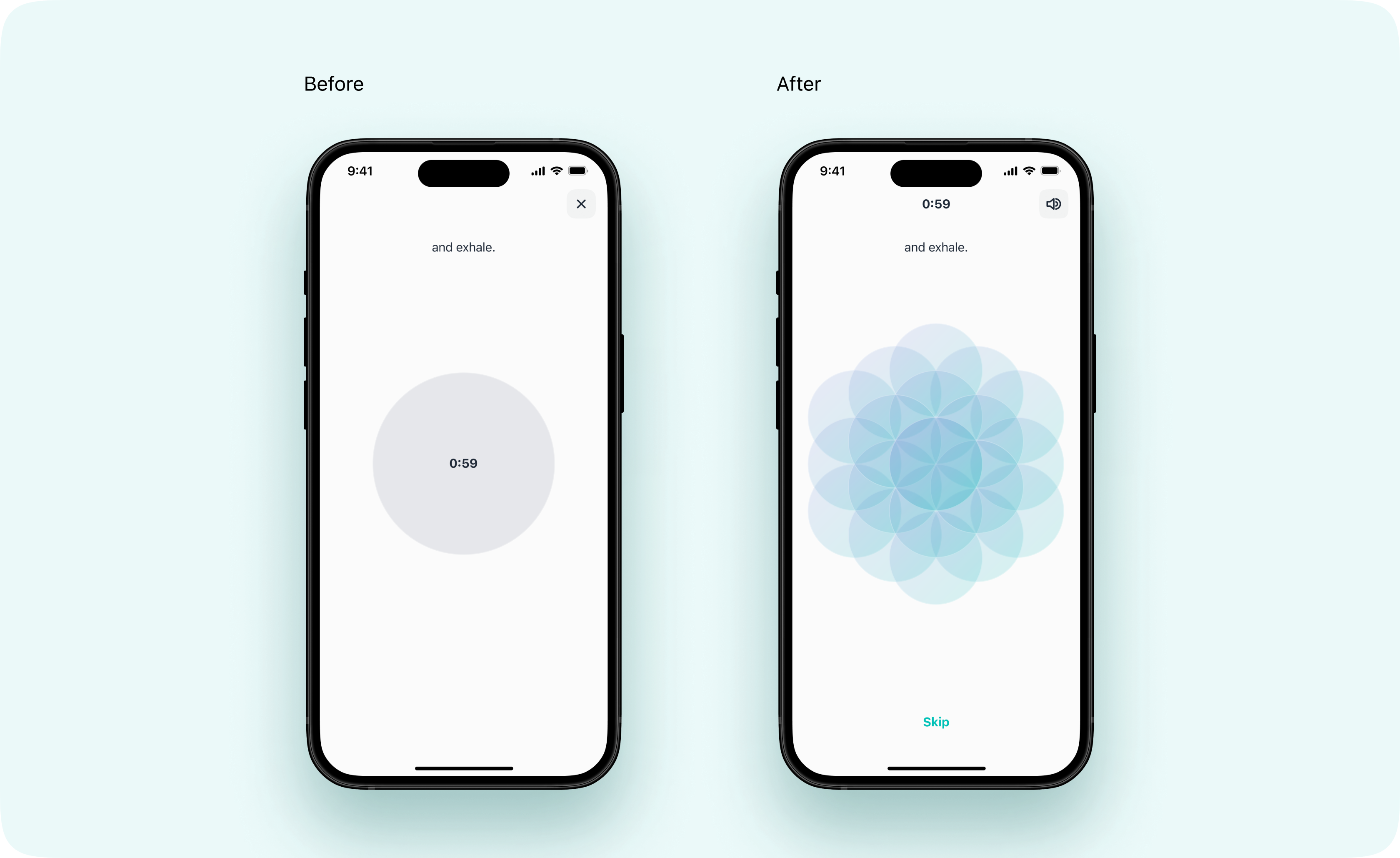
The initial Breathing Exercise design, as seen in the “before” screens, was minimalistic to the point of being visually unengaging. It presented a plain circle and text instructions, with limited sensory feedback. This lack of interactivity and aesthetics made it difficult for users to fully immerse in the experience, impacting the feature’s effectiveness in delivering quick emotional relief.
Solution
To transform the Breathing Exercise into a more immersive, calming, and engaging experience, I led a complete redesign focused on enhancing both visual aesthetics and interactivity:
-
Flower of Life Animation: I introduced a calming “Flower of Life” animation that spins and moves gently at the beginning, immediately creating a soothing effect as users prepare for the exercise. This symbol was selected for its visually harmonious pattern, which promotes a sense of tranquility and balance, supporting the user’s relaxation journey from the very start.
-
Guided Breathing with Interactive Cues: During the exercise, users initially see a simple circle. A voice guide was added to instruct users on when to inhale and exhale, providing an audio cue that aligns with the visual expansion of the circle. As the exercise progresses, the circle gradually transforms into the Flower of Life symbol, offering a dynamic, evolving visual that reinforces calmness and focus.
-
Enhanced Sensory Feedback: To deepen engagement, I introduced haptic feedback that aligns with the breathing prompts, providing a tactile cue to help users stay in sync with the exercise.
Impact
The redesigned Breathing Exercise had a significant impact on user engagement and satisfaction:
-
Engagement Increase: User interaction with the Breathing Exercise feature increased by 30%, indicating a higher level of interest and usage due to the engaging visual and interactive elements.
-
User Satisfaction: Post-exercise surveys showed that 85% of users felt more relaxed or in control after using the breathing exercise, with specific praise for the Flower of Life animation and haptic feedback.
-
Feature Retention: Early data indicated that users who tried the breathing exercise were 15% more likely to return to the app within a week, suggesting that the feature is fostering a positive user experience.
Learning
This experiment highlighted the importance of combining visual aesthetics, sensory feedback, and personalization in creating effective mental health tools. I discovered that even small elements, like a calming animation or haptic feedback, can significantly enhance user engagement and improve the exercise’s effectiveness. Moving forward, I plan to incorporate similar interactive, multi-sensory elements into other features to support users in managing stress and enhancing their overall experience.